




 For all latest news, follow the Daily Sun's Google News channel.


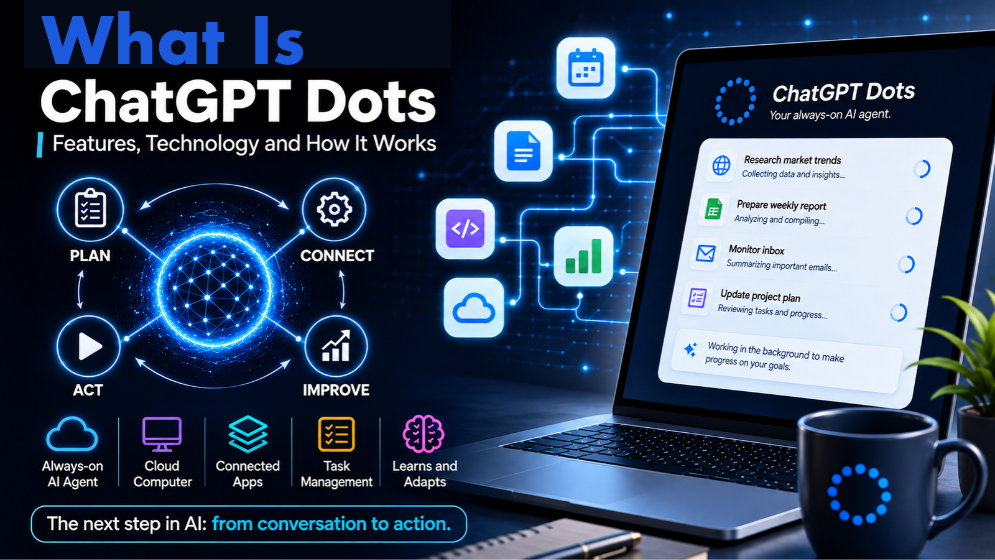
OpenAI's ChatGPT dots are always-on AI agents designed to manage ongoing tasks using cloud computers, connected applications and persistent context.
Artificial intelligence is moving beyond systems that simply answer questions. The next phase focuses on AI agents that can take responsibility for ongoing tasks, use connected applications and continue working even when users are away.
OpenAI's ChatGPT dots represent this shift. Introduced in September 2026, dots are designed as always-on AI agents that can manage projects, conduct research, organise information and make progress towards a user's goals using their own cloud computers and connected tools.
Unlike a traditional chatbot that waits for each new prompt, a dot can maintain context, handle multiple steps and ask for human input when a decision requires judgement.
But how do these AI agents work, what can they do, and how might they change the way people use artificial intelligence?
What Are ChatGPT Dots?
ChatGPT dots are always-on AI agents built into ChatGPT. They are designed to help users manage ongoing responsibilities rather than simply respond to individual questions.
OpenAI introduced dots on September 29, 2026. Powered by GPT-6 Astra, each dot has its own cloud computer and browser. It can connect to more than 4,000 applications through OpenAI's plugin ecosystem, learn from user feedback and continue working towards assigned goals.
Users can communicate with their dots through ChatGPT, Slack and Microsoft Teams, as well as voice calls. The aim is to make AI a more continuous part of everyday work.
Why Did OpenAI Introduce Dots?
Traditional AI assistants generally follow a question-and-answer pattern. A user sends a prompt, receives a response and provides another instruction when more work is needed.
Although modern AI systems can search the web, analyse files and use external tools, users often have to guide each stage of a task.
Dots introduce a different approach. Instead of requiring instructions for every step, an agent can take responsibility for a broader goal, track progress and determine what needs to happen next.
For example, a content creator could ask a dot to process an interview transcript, identify potential video clips, prepare show notes and draft social media posts for review. The creator can then focus on editing and publishing while the agent handles parts of the preparation.
This reflects OpenAI's broader ambition to move AI from a conversational assistant towards a system that can help carry out ongoing work.
How Do ChatGPT Dots Work?
Dots combine AI reasoning, cloud computing, connected applications, memory and safety controls. Together, these technologies allow an agent to understand a goal, plan its work and use available tools to make progress.
The process involves several stages:
Understanding the goal: The user explains what needs to be accomplished and provides relevant context, files or preferences.
Planning the work: The dot breaks the goal into smaller steps and identifies the information and tools required.
Using its cloud computer: It can browse websites, work with files and use software in its dedicated cloud environment.
Connecting applications: It accesses supported services that the user has connected and authorised.
Continuing the task: It tracks progress and works on the remaining steps between conversations.
Reporting and receiving feedback: It shares results, asks for input when necessary and adjusts its approach based on user feedback.
Key Features of ChatGPT Dots
Always-On AI Agents
Dots are designed to remain available and continue working towards assigned goals. They can manage multiple responsibilities and make progress even when users are not actively interacting with ChatGPT.
This can be useful for projects that require regular follow-up, research or updates.
Dedicated Cloud Computer and Browser
Each dot has its own computer and browser in the cloud. It can use this environment to research information, manage files and interact with supported software.
The cloud computer operates separately from a user's personal device. Users can inspect the agent's work and take control when necessary.
A personal computer can also be connected optionally, allowing a dot to work with supported local files and applications. The connected computer must remain online and have the ChatGPT app open.
Connected Applications
OpenAI says dots can connect to more than 4,000 applications through its plugin ecosystem.
These integrations allow an agent to work across different services rather than remaining limited to the ChatGPT conversation. Depending on the available integration and permissions, it may access information, organise documents or prepare work within an external application.
Users choose which applications to connect and what access to provide.
Memory and Context
Dots can use relevant ChatGPT memory, conversation history and their own saved notes to maintain continuity.
This helps an agent remember information about ongoing projects, previous decisions and user preferences. It can build on earlier work rather than treating every interaction as a completely new task.
Feedback also helps the agent understand how users prefer their work to be organised and presented.
Communication Across Platforms
Users can interact with their dots through ChatGPT, Slack and Microsoft Teams. Voice calls are also supported.
This allows users to communicate with the same agent through different supported channels while maintaining relevant context.
OpenAI has also started rolling out text messaging with dots in beta to eligible Pro users in the United States.
Proactive Research and Background Tasks
Dots can conduct background research using permitted information from connected applications. They can gather relevant information and prepare updates without requiring users to remain active in the conversation.
OpenAI describes proactive research as read-only, meaning it cannot use this process to send messages or make changes to connected application content.
Dots can also delegate parts of their work to background agents and track the results. This can help manage complex projects involving several related activities.
The Technology Behind ChatGPT Dots
Dots are not simply another language model. They combine several technologies to make AI more capable of carrying out multi-step responsibilities.
Large Language Models and Reasoning
Language models provide the intelligence needed to understand instructions, interpret information, plan tasks and generate responses.
Dots are powered by GPT-6 Astra. The model handles reasoning and helps determine how to approach a task, while other components provide access to computing resources and external tools.
Cloud Computing and Browser Automation
Cloud computing gives each dot a separate environment in which it can work. Its browser can access websites and perform permitted tasks without relying on the user's personal browser session.
Application Integrations
An AI model may understand what needs to be done, but it needs tools to interact with external services.
Plugins and application integrations provide these capabilities. They allow dots to access permitted information and functions within connected services.
The available integrations and permissions determine what an agent can actually do.
Memory, Planning and Delegation
Memory helps dots maintain context across conversations and projects. Planning allows them to divide complex responsibilities into smaller steps, while delegation enables background agents to handle parts of the work.
Together, these capabilities help dots manage tasks that require several actions over time.
What Can ChatGPT Dots Do in Real Life?
The usefulness of an AI agent depends on how well it supports practical work. Dots can assist with activities across research, journalism, business, software development and content production.
Research and Information Monitoring
Researchers and analysts can use dots to follow a topic, organise information and investigate new evidence.
An agent could gather relevant information from permitted sources, update an analysis and prepare a summary of findings for review.
Journalism and Digital Publishing
For news organisations and digital publishers, dots could assist with research organisation, interview preparation and content production.
An agent could process an interview transcript, identify potential video clips, prepare show notes and draft social media posts for editorial review.
It could also help organise information related to a developing story. However, journalists and editors must verify facts, quotations and original sources before publication. AI-generated material should remain subject to editorial judgement.
Business and Project Management
Businesses can use dots to organise project information, monitor changing requirements and prepare updates.
For example, an agent could review connected project documents, identify outstanding decisions and prepare revised proposals when requirements change.
Software Development
Dots can support software development by investigating reported problems, reviewing relevant information and preparing code changes for developers to test.
This can help organise technical work, although proposed changes still require proper testing and human review.
Content Creation
Content creators can use dots to support different stages of production. An agent could process an interview transcript, identify suitable moments for short videos, prepare descriptions and draft social media posts.
It can also carry user feedback across related materials, helping creators spend more time on creative decisions and less on repetitive preparation.
ChatGPT Dots and the Evolution of AI Agents
The introduction of dots reflects a broader development in artificial intelligence known as agentic AI.
Traditional chatbots primarily respond to user instructions. AI agents are designed to pursue goals through a sequence of actions, using tools and adapting their approach as information changes.
An AI agent may need to understand a request, plan the work, retrieve information, interact with software and evaluate the results. These capabilities allow it to handle tasks that involve more than generating a single answer.
Dots bring several of these capabilities together in a continuous working environment.
Privacy, Security and Human Control
Giving an AI agent access to applications, files and online services creates important questions about privacy and security.
OpenAI says dots include several safeguards designed to help users maintain control over their work.
Separate cloud environment: A dot uses its own cloud computer. A personal computer remains separate unless the user chooses to connect it.
Permission controls: Users decide which applications a dot can access.
Automatic action reviews: Certain actions that could affect accounts or share information are checked against user instructions and safety requirements.
Human approval: Dots can request approval when an action requires user permission.
Sensitive actions: Some tasks, such as changing a password, must be completed by the user.
Safety monitoring: The system can pause or stop an agent if it detects a potential safety concern.
Activity monitoring: Users can review progress, inspect completed tasks and redirect an agent when necessary.
These safeguards are important, but they do not make AI agents completely risk-free. Users should review consequential work and avoid granting unnecessary access.
Understanding Prompt Injection Risks
Prompt injection is one of the security challenges associated with AI agents.
A webpage, email or document may contain malicious instructions designed to manipulate an AI system. If an agent encounters such content while researching or completing a task, it could potentially be influenced to act against the user's original instructions.
This risk becomes particularly important when an agent can access connected applications or interact with external websites.
OpenAI's safeguards are designed to reduce these risks, but users should still connect only the services an agent needs and carefully review important actions.
Who Can Use ChatGPT Dots?
OpenAI is gradually rolling out dots across eligible ChatGPT plans and regions.
According to its current Help Center guidance, dots are available to eligible Pro users aged 18 or older in supported markets, excluding the European Economic Area, Switzerland and the United Kingdom at launch. Business Premium users can also access dots in supported regions.
Dots are generally available to eligible Enterprise, Edu and Healthcare workspaces, subject to workspace settings and administrator controls. Access may vary depending on regional eligibility and account configuration.
Users can create a dot through the ChatGPT mobile app, desktop app or desktop web. Mobile web is not currently supported.
Availability in Bangladesh should be checked through the user's ChatGPT account and the official OpenAI Help Center, as access depends on the subscription and regional rollout.
Limitations and Challenges
Despite their potential, AI agents are not error-free. Their performance depends on the quality of the underlying model, available tools and instructions provided by users.
Some important limitations include:
Accuracy: An agent may misunderstand instructions or produce incorrect information. Important claims should be checked against original sources.
Complex tasks: Multi-step projects can involve unexpected changes or decisions requiring human judgement.
Application permissions: An agent can only use information and functions available through its connected applications and permissions.
Security risks: Access to emails, documents and external services creates potential privacy concerns.
Human oversight: Important decisions and consequential actions still require users to review the results.
Reliability: A task being marked complete does not necessarily mean every result is accurate or suitable for use.
The wider AI industry must continue addressing these challenges as agents become more capable and are given greater responsibility.
The Future of AI-Powered Work
The development of dots points towards a future in which AI systems can become more deeply involved in everyday professional workflows.
Instead of using separate tools for research, writing, communication and project management, users may increasingly rely on AI agents to coordinate different stages of their work.
For businesses, this could mean more automated administrative processes and better coordination across applications. For individuals, it could mean less time spent on repetitive tasks and more time for creative thinking, decision-making and problem-solving.
FAQ ChatGPT Dots:
What are ChatGPT dots?
ChatGPT dots are always-on AI agents built into ChatGPT. They can manage ongoing tasks, use connected applications and continue making progress between conversations.
When did OpenAI introduce dots?
OpenAI introduced dots on September 29, 2026.
Which AI model powers dots?
Dots are powered by GPT-6 Astra, which provides the reasoning capabilities needed to understand instructions and manage tasks.
How are dots different from regular ChatGPT?
A regular ChatGPT conversation generally focuses on responding to individual prompts. Dots are designed to manage ongoing responsibilities, track progress and follow through on tasks between conversations.
Can dots access a personal computer?
Not automatically. Each dot has its own cloud computer. Users can optionally connect a personal computer to provide access to supported local files and applications.
Are ChatGPT dots available in Bangladesh?
Access depends on the user's subscription, account eligibility and regional rollout. Users should check their ChatGPT account and the official OpenAI Help Center for current availability.
Are ChatGPT dots safe?
OpenAI has introduced permission controls, action reviews and safety monitoring. However, dots can still make mistakes, so users should review important work and avoid granting unnecessary access.
Conclusion
ChatGPT dots represent an important step in the evolution of artificial intelligence, moving beyond conventional conversations towards AI agents that can manage ongoing responsibilities.
By combining language models, cloud computing, connected applications, persistent context and safety controls, dots aim to make AI more useful in everyday work.
Their potential applications range from research and digital publishing to business operations and software development. Yet their success will depend on accuracy, reliability, responsible access and meaningful human oversight.
As AI agents continue to develop, the relationship between people and technology may shift from asking AI for answers to working alongside AI systems that can help carry out entire projects.